
Read the articles and guides to learn more about DVD copying and DVD ripping
    |

 Popular Topics
- DVD, Blu-ray VS. Streaming
- DVD Movie to Google Nexus 6P
- DVD to Samsung Galaxy S6/S6 Edge
- Rip DVD Movie for Roku 3
- Google Nexus 9 vs Nexus 7
- DVD to iPad Air 2
- DVD to iPhone 6/6 Plus
- Copy and Rip DVD on Yosemite
- DVD to iPhone 5
- DVD to Galaxy S3
- DVD to Galaxy note
- DVD to the new iPad
- DVD to HTC One X
- Burn Avengers DVD to blank disc
- DVD to Huawei Ascend D2/Mate
- DVD to BlackBerry Z10
- DVD to Huawei Windows Phone 8 - Ascend W1
- Copy Skyfall DVD on hard drive
- Convert The Hobbit: An Unexpected Journey to MP4
- DVD to LG Optimus G
- DVD to Phablet Converter
- Nexus 10 vs iPad 4 vs Kindle Fire HD 8.9 vs Samsung Note 10.1
- DVD to Nokia Lumia 920
- DVD to Sony Xperia S
- Backup Top 10 Horror Movies
Articles & Guides
For Windows users
With DVD Smith Movie Backup for Mac, you can copy DVD movie with 1:1 ratio with the same quality of source DVD. You can play your copied DVD on your Mac with any free player, such as VLC player. This backup solution avoids the inevitable risk of getting your originals of your DVD movie discs scratched or damaged. You get disc protection with no loss of playback quality.
If you need to copy movie DVD to DVD disc, please use Any DVD Cloner. It's an easy-to-use and powerful DVD copying tool!
How to play DVD folder on Mac with VLC player?
VLC media player is a highly portable multimedia player supporting most audio and video formats (H.264, Ogg, DivX, MKV, TS, MPEG-2, mp3, MPEG-4, aac, ...) from files, physical media (DVDs, VCD, Audio-CD), TV capture cards and many network streaming protocols.
It can also convert media files, transcode and act as a streaming server over unicast or multicast and IPv4 or IPv6. It doesn't need any external codec, program or codec pack to work.
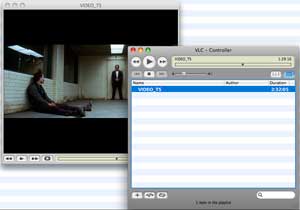
When copying DVD to Mac as DVD folder with DVDSmith Movie Backup for Mac, you can play it with VLC Media Player.
1. Open VLC player
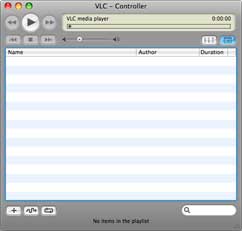
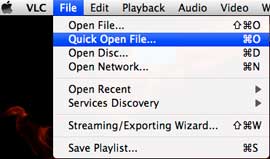
2. Click File > Open Folder on the top side of toolbar
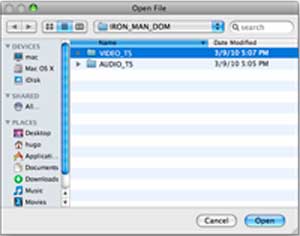
3. Click VIDEO_TS folder then click OK
4. Now you can enjoy DVD on your Mac with VLC player
Home | About | Legal Notices | Sitemap | Spotify Music Converter | Apple Music Converter | Amazon Music Converter | Tidal Music Converter | Streaming Audio Recorder | Video Enhancer AI | Face Blur AI | Photo Enhancer AI | AI Image Upscale | Streaming Video Downloader | Disney+ Video Downloader | HBOMax Video Downloader | Amazon Video Downloader | Netflix Video Downloader | YouTube Video Downloader | YouTube Music Converter
Copyright © 2005-2023 DVDSmith Inc., All Rights Reserved.