
Any DVD Cloner Platinum - Copy encrypted DVD movies and rip DVD to various video formats including MP4, M4V, AVI, M2TS etc. for mobile devices: iPhone, iPad, Android devices, etc.
    |

- Decrypt any region code and copy protections: CSS, Arccos, UOPs, etc
- Clone/shrink DVD9 to DVD5 with four clone modes/Erase DVD+RW/DVD-RW
- Rip protected DVD to MP4, M4V, AVI, HTML5 embedded Video, etc.
- Convert DVD to videos - playback on Android/iPhone/iPad/xbox One etc.
$49.95 $39.95 Version: 1.3.7


"I have been using your software for cloning DVDs for a number of years now and i would never use any other. Thank you."
-Paul Jenkins
Hot Topics
- Convert DVD Movie for Roku 3
- DVD Converter for Yosemite
- Google Nexus 9 vs Nexus 7
- How to Play DVD ton iPad Air 2
- DVD to iPhone 6/6 Plus
- Samsuang Tas S vs iPad Air
- Play DVD on Sony Xperia Z2
- Good DVD Player: Sony PS4
- DVD to Samsung Galaxy S5
- Stream DVD via Xbox One




Any DVD Cloner Platinum is a powerful combination of DVD cloner and DVD ripper. As a DVD cloner, it provides 4 flexible copying modes to copy, clone or compress DVD to DVD, DVD folder or ISO image with all protections decrypted and removed. As a DVD ripper, it can rip any DVD to MP4, M4V, AVI, M2TS, HTML5 embedded video, easy to convert encrypted DVDs to videos supported by popular devices like iPhone 6/6 Plus, iPhone 6S/6S Plus, iPod, iPad Air 2, iPad mini 4, Samsung Galaxy S6, Nexus, Roku, Xbox One, Sony PS4, etc.
- Decrypt and remove any region code and all CSS copy protections
(How to remove CSS protection...) - 4 copy modes to copy DVD to DVD, DVD folder or ISO image
- Erase DVD-RW or DVD+RW
- Rip protected movie DVDs to different video formats: MP4, M4V, AVI, M2TS, HTML5 Embedded videos, 3GP, 3G2, MPG, MPEG.
- Convert DVD to videos for playback on iPhone6/6 Plus, iPad, PSP, Samsung Galaxy Note 4, Google Nexus series. More devices...
- Burn DVD Folder or ISO files to blank DVD disc in 1:1 ratio
Note: Any DVD Cloner Platinum for Windows is a home edition and it's only for personal use. Any copyright violation behaviors are not encouraged.
Features

DVD copy protections like CSS, RC, RCE, APS, UOPs, ARccOS, etc. prevent you from copying DVD to DVD or hard drive, and now Any DVD Cloner Platinum comes to help. With this powerful DVD decrypter, you can easily get rid of all annoying protections of newly released movie DVDs and make perfect DVD copies for personal use freely.

Any DVD Cloner Platinum provides 4 DVD copying modes which help you to back up DVD flexibly and conveniently.
Full Disc: Copy all titles, chapters, special features, subtitles, audio tracks, etc.
Main Movie: Copy the main title only to skip ADs, warnings, trailers, etc.
Customize: Select desired titles, chapters, subtitles and audio tracks, etc. to copy.
Clone: Clone DVD to DVD in exact 1:1 ratio with 100% quality preserved.
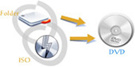
Any DVD Cloner Platinum enables users to burn DVD Folder or ISO Image File from hard drive to blank DVD disc with perfect quality in 1:1 ratio. Have some DVD Folder or ISO Image File on your hard drive? Try Any DVD Cloner Platinum and burn them to discs now!
Any DVD Cloner Platinum can erase written DVD-RW or DVD+RW independently. Wanna erase burnt DVD? Try "Erase DVD" feature.
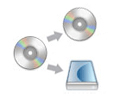
Any DVD Cloner Platinum allows you to copy or compress DVD to different destinations including DVD to DVD, DVD to DVD folder and DVD to ISO image. DVD copy protections will be automatically removed while copying. For compressing DVD-9 to DVD-5, you just need to set output DVD size to DVD-5 4.7G.

Any DVD Cloner Platinum can rip any DVD movies to popular video formats like MP4, MKV, M4V, M2TS, AVI, easy to play ripping videos on iPod, iPhone 6/6 Plus, iPad Air 2, iPad mini, Android devices like Samsung Galaxy S5, Google Nexus and other devices like Roku, Xbox One, Sony PS4, etc.

From version 1.2.1, Any DVD Cloner Platinum provides up-to-date feature: convert movie DVDs to HTML5 embedded videos. Easy to convert DVD to MP4 files for embedding on HTML5 page.
Wanna convert videos to HTML5 embedded videos? Try Any Video Converter Ultimate - it can easily encode and create the HTML5 video online.

Any DVD Cloner Platinum provides advanced options for both DVD copying and DVD ripping. You can select burning engine, set temporary workplace folder for DVD copying, set video and audio options as well as select title and chapter for DVD ripping.
| Delivery | Keycode |
| File Size | 14.1 MB |
| Version | 1.3.7 |
| Platform | Windows XP, Vista, Windows 7; Windows 8 & Windows 10 |
| Supported Input Formats | |
| DVD Disc | DVD Disc (DVD 9 & DVD 5) |
| Supported Output Formats | |
| Disc | DVD-RAM, DVD+R, DVD+RW, DVD+R Dual Layer, DVD-R, DVD-RW, DVD-R Dual Layer |
| DVD File | DVD Folder(Video_TS), ISO Image File |
| System Requirements | |
| OS | XP, Vista (32bit & 64bit), Windows 7 (32bit & 64bit), Windows 8 & Windows 10 |
| CPU | 1GHz Intel/AMD processor or above |
| RAM | 256MB RAM (512MB or above recommended) |
| Free Hard Disk | 40MB for installation, 4.7GB or more for temporary folder |
| DVD-Rom | A Recordable DVD Drive |
Click the thumbnail to view larger image
1. How to Copy DVD Movie to DVD disc?
Step 1. Select DVD copy method and set temporary folder.
Run Any DVD Cloner Platinum, and click question mark on the upper right window to set temporary folder location for DVD copying. It's recommended to use Lowly Enhanced or Highly Enhanced Open Method which may help you to find the exact real main movie title from a list of potential fake titles in some latest DVD movies.
Step 2. Set source and target DVD drive. You can set source and target to same DVD recorder.
Step 3. Insert DVD movie disc and click Open DVD button to load.
Step 4. Choose DVD Copy Mode.
step 5. Start Copying. If you have only one recordable DVD-ROM, Any DVD Cloner Platinum will automatically eject DVD movie disc and ask you to insert a writable DVD disc.
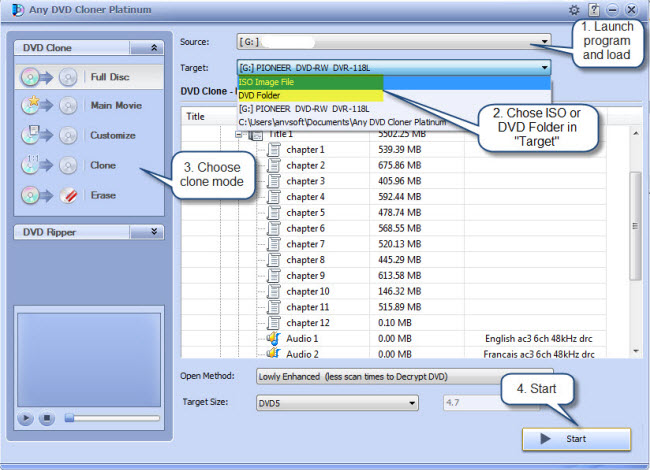
2. How to Backup DVD Movie to Hard Drive?
Step 1. Select DVD copy method and set temporary folder.
Step 2. Insert DVD movie disc and click Open DVD button to load.
Step 3. Set source DVD drive and output destination for DVD folder or ISO image.
Step 4. Choose DVD Backup Mode.
Step 5. Start Copying. Please make sure you have enough free disk space for either temporary folder or output destination.
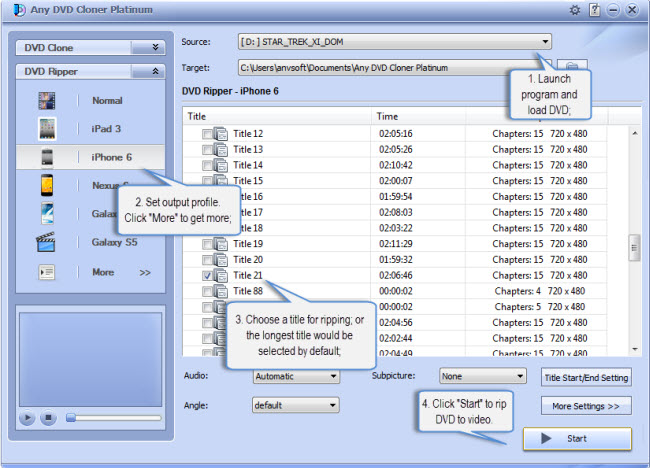
3. How to Rip Protected DVD to Videos?
Step 1. Click DVD Ripper and select output format or output devices.
Step 2. Select your favorite audio track and subtitle.
step 3. Click Title Start/End Setting button to choose the titles and chapters you want to rip.
Step 4. Click More Settings button to adjust video & audio parameters, frame size and cropping area.
Step 5. Start ripping DVD.
Home | About | Legal Notices | Sitemap | Spotify Music Converter | Apple Music Converter | Amazon Music Converter | Tidal Music Converter | Streaming Audio Recorder | Video Enhancer AI | Face Blur AI | Photo Enhancer AI | AI Photo Edtior | AI Image Upscale | Streaming Video Downloader | Disney+ Video Downloader | HBOMax Video Downloader | Amazon Video Downloader | Netflix Video Downloader | YouTube Video Downloader | YouTube Music Converter | Data Loss Prevention
Copyright © 2005-2026 DVDSmith Inc., All Rights Reserved.