
Read the articles and guides to learn more about DVD copying and DVD ripping
    |

 Popular Topics
- DVD, Blu-ray VS. Streaming
- DVD Movie to Google Nexus 6P
- DVD to Samsung Galaxy S6/S6 Edge
- Rip DVD Movie for Roku 3
- Google Nexus 9 vs Nexus 7
- DVD to iPad Air 2
- DVD to iPhone 6/6 Plus
- Copy and Rip DVD on Yosemite
- DVD to iPhone 5
- DVD to Galaxy S3
- DVD to Galaxy note
- DVD to the new iPad
- DVD to HTC One X
- Burn Avengers DVD to blank disc
- DVD to Huawei Ascend D2/Mate
- DVD to BlackBerry Z10
- DVD to Huawei Windows Phone 8 - Ascend W1
- Copy Skyfall DVD on hard drive
- Convert The Hobbit: An Unexpected Journey to MP4
- DVD to LG Optimus G
- DVD to Phablet Converter
- Nexus 10 vs iPad 4 vs Kindle Fire HD 8.9 vs Samsung Note 10.1
- DVD to Nokia Lumia 920
- DVD to Sony Xperia S
- Backup Top 10 Horror Movies
Articles & Guides
How to Remove CSS Protection ?
The CSS (Content Scrambling System) is a digital rights management (DRM) and encryption method used in commercial DVD production to prevent DVD data from being copied. The sole purpose of the CSS is to protect copyrights by preventing the pirating of DVDs. It utilizes a relatively weak, proprietary 40-bit stream cipher algorithm. The system was introduced around 1996 and has subsequently been compromised.
The CSS key sets are licensed by the DVD Copy Control Association to manufacturers who incorporate them into products such as DVD movie releases, drives & players. Most DVD players are equipped with a CSS Decryption module. CSS key is a collective term for authentication key, disc keys, player keys, title keys, secured disk key set, and/or encrypted title keys. Some of the keys are stored on the lead-in area of the disk, which is generally only read by compliant drives. Keys can be passed from a DVD drive to a descrambler over a PC bus using a secure handshake protocol.
The purpose of CSS is two fold. First and foremost, it prevents byte-for-byte copies of an MPEG stream from being playable since such copies will not include the keys that are hidden on the lead-in area of the protected DVD disk. Second, it provides a reason for manufacturers to make compliant devices, since CSS scrambled disks will not play on noncompliant devices. Anyone wishing to build compliant devices must obtain a license, which contains the requirement that the rest of the copy-protection system be implemented.
DVDSmith Movie Backup is a free and effective "DVD Region + CSS Free" utility for backup DVDs to hard drive for personal usage. It smartly removes CSS encrypted content form dvd and copy/backup DVD to hard disk. With its help, your DVD player will be able to play all region DVD on all DVD drives with mismatched region code without changing the region code. You needn't hack DVD Rom or DVD-R/DVD+RW(flash firmware) which is very dangerous.
User Review: "This app works like a charm! - "DVD Smith Movie Backup can backup a DVD to the computer with little user interaction. It can deal with region codes and copy protections so that all movies can be copied with ease. Granted that was a while ago but still the fact is that DVDSmith has never let me down. If you have a region locked drive and a a CSS encrypted DVD then try this. DVDSmith is IMO the best option.."- Nick
Except CSS Encryption, there are many other kinds of DRM, such as Apple FairPlay. iTunes downloaded movies, TV shows, and music videos are strictly protected by FairPlay. Apple FairPlay DRM limits iTunes videos from playing on other non-Apple devices, which brings much inconvenience to iTunes users. Fortunately, there comes Noteburner M4V Converter Plus for rescue. Noteburner M4V Converter Plus (For Winodws / For Mac) is the best iTunes DRM Removal Software for both Windows & Mac users, which can help them to remove the DRM protection from iTunes M4V rentals and purchases to MP4, MOV, AVI, FLV etc formats for playing on TV, game consoles, Android phones/tablets, HD media players and other portable devices.
Use DVDSmith to Remove CSS Encryption from DVDs on XP & Vista
You may have bought lots of favorite DVD movies from your local stores, flea markets, or even online stores, such as eBay and amazon, and you would like to play them on any computers and DVD players. Unfortunely, these DVDs are either CSS encrytped or region codes locked.
To remove encryption (CSS) and region code from your favorite DVDs and copy them to your hard drive, please simply follow instructions below to use DVDSmith Movie Backup:
Step 1. Insert a DVD in your DVD drive
Step 2. Choose backup mode
In the main work space, you can see two backup modes:
Full Disc: This will backup all contents from the DVD, including main movie, bonus features, and maybe some other extra video clips.
Main Movie: This will only backup the main movie from the DVD, excluding bonus features or other extra video clips.
(Note: see the difference between these two modes)
Step 3. Select source disk location
All DVD drivers will be listed in the drop down list. Select the drive where the movie DVD is inserted.

Step 4. Select output folder path
Remember to choose a place where there's enough space to put the backup files.

If the Free Space of Hard Disk is smaller than the DVD Size, you should press this  button to change output folder with enough free space in the disk.
Otherwise, this prompt will appear:
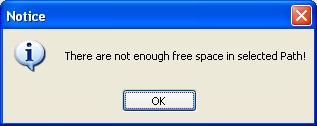
Step 5. Select Copy Method.
There are three copy methods availalbe of copying DVD to hard drive with DVDSmith Movie Backup. The DVD copy methods are:
Normal: For unencrypted and CSS encrypted DVD.
Lowly Enhanced: less scan times to decrypt DVD.
Highly Enhanced: more scan times to decrypt DVD.
Step 6. Start backup
After all DVD copying settings are done, press "Start Backup" button to start the DVD copying process.
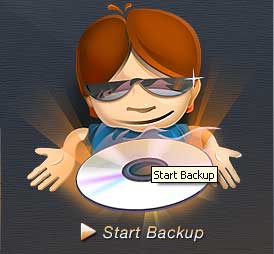
If you decide to backup later or just want to cancel it, press "Stop Backup" button to stop the DVD copying process.
Step 7. Check the Output Folder
Once the backup process is finished, you can explore them on the hard disk:
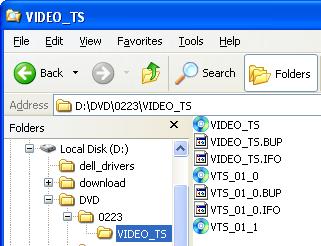
(Note: above file illustration is in Full Disc mode. If using Main Movie mode, there will be different.)
Further Reading: Best DRM Removal You Should Know

If you would like to remove DRM protection from Apple Music and convert them to common audio files, you need the help from Apple Music converter. Apple Music converter is a powerful audio converter that removes DRM from Apple music and convert Apple Music songs in common MP3, AAC, FLAC or WAV format, so that you could play Apple Music songs with your music player more freely. Read more >>



Looking for a Spotify Music converter that could help you download Spotify music for free, then you should not miss this Spotify Music Converter. Spotify Music Converter perfectly helps you convert DRM-ed Spotify music to plain MP3, AAC, FLAC or WAV. In this way, users can get rid of the restriction of DRM, enjoy the Spotify music on any of your device offline, such as MP3 Player, car players, iPhone. Read more >>
Home | About | Legal Notices | Sitemap | Spotify Music Converter | Apple Music Converter | Amazon Music Converter | Tidal Music Converter | Streaming Audio Recorder | Video Enhancer AI | Face Blur AI | Photo Enhancer AI | AI Photo Edtior | AI Image Upscale | Streaming Video Downloader | Disney+ Video Downloader | HBOMax Video Downloader | Amazon Video Downloader | Netflix Video Downloader | YouTube Video Downloader | YouTube Music Converter | Data Loss Prevention
Copyright © 2005-2026 DVDSmith Inc., All Rights Reserved.