
Read the articles and guides to learn more about DVD copying and DVD ripping
    |

 Popular Topics
- DVD, Blu-ray VS. Streaming
- DVD Movie to Google Nexus 6P
- DVD to Samsung Galaxy S6/S6 Edge
- Rip DVD Movie for Roku 3
- Google Nexus 9 vs Nexus 7
- DVD to iPad Air 2
- DVD to iPhone 6/6 Plus
- Copy and Rip DVD on Yosemite
- DVD to iPhone 5
- DVD to Galaxy S3
- DVD to Galaxy note
- DVD to the new iPad
- DVD to HTC One X
- Burn Avengers DVD to blank disc
- DVD to Huawei Ascend D2/Mate
- DVD to BlackBerry Z10
- DVD to Huawei Windows Phone 8 - Ascend W1
- Copy Skyfall DVD on hard drive
- Convert The Hobbit: An Unexpected Journey to MP4
- DVD to LG Optimus G
- DVD to Phablet Converter
- Nexus 10 vs iPad 4 vs Kindle Fire HD 8.9 vs Samsung Note 10.1
- DVD to Nokia Lumia 920
- DVD to Sony Xperia S
- Backup Top 10 Horror Movies
Articles & Guides
Make 1:1 ratio copy of protected dvds on Mac OS, Snow Leopard
Do you like watch movies? I think your answer is definitly yes! Most people like to watching dvd movies instead of relaxing,especially during our holidays.But have you ever been frustrated by the scratched DVDs? So it is necessary to find an active and effective way to solve the problem.Backup your dvd movies is one of the best way to keep the DVDs safe. But so many softwares in front of you,it 's so difficult to choose which software would be best for you.But another problem raised that many softwares doesn't work on copying the DVD movies,what's going on?You will probably be confused by the fact.The truth is that most dvds copy are protected.Especially the latest DVD movies.
Backup Protected DVD Movies to Hard Drive on Mac
The latest copy protections prevent those DVDs from ripping or backing up. However, solution is never far behind. DVDsmith Software could help you out.They are designed for Windows and Mac OS users respectively to Make 1:1 ratio copy of protected dvds on Mac OS, Snow Leopard.you can easily get your DVD copies which remain 100% same to the original DVD movie Discs. DVDsmith is a professional DVD decrypter and DVD ripper software which can backup protected DVDs to Mac as sMP4, MOV, iTunes video formats. You could also transfer the DVD videos to iPhone, DVD to iPod, DVD to iPad, DVD to Apple-TV, DVD to PSP, etc.DVDsmith for snow leopard also allows you to remove DVD menus, select subtitles and audio tracks, or clone main movie separately to create customized DVD.What’s more, DVDsmith for snow leopard can copy DVD with any region code.
 How To Make 1:1 Ratio Copy of Protected DVDs on Mac OS
Then how to backup DVD movies to hard drive or copy DVD to your Mac OS? Below are the basic steps for Mac users to copy DVD.
Step 1. Inserting DVD disc
Insert the DVD disc you want to backup in the DVD-ROM of your Mac, and then you should wait a second for Mac reading the data of the disc.
Step 2. Choosing backup mode
There are two backup modes for you to choose.
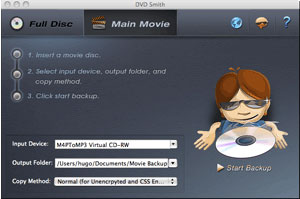
Full Disc: This will backup all contents from the DVD, including main movie, bonus features, and maybe some other extra video clips.
Main Movie: This will only backup the main movie from the DVD, excluding bonus features or other extra video clips.
(Note: see the difference between these two modes)
Step 3. Selecting input device, output folder, and copy method
Input Device: select correct DVD device from Input Device dropdown menu.
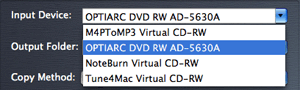
Output Folder: choose a place that has enough space to store output file.

Copy Method: there are two copy methods for you to choose:

Normal (for Unencrypted and CSS Encrypted DVD):
when Normal copy method is used, the program will focus on scanning the main movie title in a DVD. If there is bad cell in the main movie title, a prompt window will come up asking you to choose Enhanced copy method.
Enhanced (for Encrypted and CSS Encrypted DVD):
when Enhanced copy method is used, the program will try to read out as much titles as it can be detected in a DVD, and it will then copy all detected titles. Particularly, the program is able to identify the main movie during the scanning process, and skip all bad cells during copying process.
It's recommended to use the Enhanced Copy Method to backup the most recent DVD movies like G.I. Joe, especially for Disney DVD movies.
Step 4. Starting backup
When setting finished, click Start Backup button to get it copied on your Mac.
Now, you can enjoy the movie on your Mac!
System Requirements
- Best DVD Copier compatible with Mountain Lion, Lion, Snow Leopard, Mac OS X 10.8, Mac os x 10.7, 10.6
- Processor – PowerPC G4/G5 or Intel processor
- Available HD space – 100 MB or more
- ROM drive – at least one DVD-ROM drive
- Display – Super VGA (800 x 600) resolution or higher
Further Reading: Bypass DRM Protection from Apple Music and Spotify Music

If you would like to remove DRM protection from Apple Music and convert them to common audio files, such as MP3, AAC, WAV or FLAC, you need the help from Apple Music converter. No matter you want to convert DRM-ed iTunes music or Apple Music, audiobooks, Apple Music converter could do them all with 20X fast speed, keeping lossless quality, retaining ID tags. Read more >>



Looking for a Spotify Music DRM Removal that could help you download Spotify music for free, then you should not miss this Spotify Music Converter. Spotify Music Converter perfectly helps you convert DRM-ed Spotify music to plain MP3, AAC, FLAC or WAV. In this way, users can get rid of the restriction of DRM, enjoy the Spotify music on any of your device offline, such as MP3 Player, car players, iPhone. Read more >>
Home | About | Legal Notices | Sitemap | Spotify Music Converter | Apple Music Converter | Amazon Music Converter | Tidal Music Converter | Streaming Audio Recorder | Video Enhancer AI | Face Blur AI | Photo Enhancer AI | AI Image Upscale | Streaming Video Downloader | Disney+ Video Downloader | HBOMax Video Downloader | Amazon Video Downloader | Netflix Video Downloader | YouTube Video Downloader | YouTube Music Converter
Copyright © 2005-2023 DVDSmith Inc., All Rights Reserved.