
Read the articles and guides to learn more about DVD copying and DVD ripping
    |

 Popular Topics
- DVD, Blu-ray VS. Streaming
- DVD Movie to Google Nexus 6P
- DVD to Samsung Galaxy S6/S6 Edge
- Rip DVD Movie for Roku 3
- Google Nexus 9 vs Nexus 7
- DVD to iPad Air 2
- DVD to iPhone 6/6 Plus
- Copy and Rip DVD on Yosemite
- DVD to iPhone 5
- DVD to Galaxy S3
- DVD to Galaxy note
- DVD to the new iPad
- DVD to HTC One X
- Burn Avengers DVD to blank disc
- DVD to Huawei Ascend D2/Mate
- DVD to BlackBerry Z10
- DVD to Huawei Windows Phone 8 - Ascend W1
- Copy Skyfall DVD on hard drive
- Convert The Hobbit: An Unexpected Journey to MP4
- DVD to LG Optimus G
- DVD to Phablet Converter
- Nexus 10 vs iPad 4 vs Kindle Fire HD 8.9 vs Samsung Note 10.1
- DVD to Nokia Lumia 920
- DVD to Sony Xperia S
- Backup Top 10 Horror Movies
Articles & Guides
Rip DVD to Samsung Galaxy Note - Any DVD Cloner Platinum
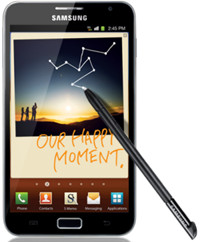
Samsung Galaxy Note features with a large 5.3 inch 800*1280 pixels resolution screen display, resulting in pixel density of 285ppi, which brings a perfect enjoyment to watch DVD movies on Galaxy Note with clear and flawless effect.
However, as we know, Samsung Galaxy Note cannot play DVD directly because it doesn't have a DVD drive. No worry! Samsung Galaxy Note is a great media player which supports a lot of media formats including files with MPEG4, H.263, H.264, DivX, Xvid, WMV as video formats, besides, the Galaxy Note can also convert DVD movies to other popular video formats like MKV, MOV, FLV, ASF, MPG, etc. while cracking the DVD CSS and region code protection.
In short, to play DVD movies on Galaxy Note, you just need to rip the DVD movies to Galaxy Note compatible video formats first. A powerful and easy-to-use DVD to Galaxy Note Ripper - Any DVD Cloner Platinum is what you need.


 Mac user please click here for Any DVD Cloner Platinum Mac
How to rip DVD to Samsung Galaxy Note with Any DVD Cloner Platinum
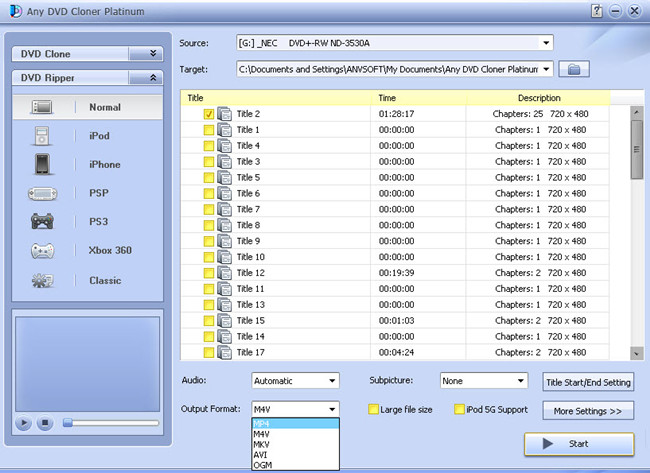
It takes a few steps to rip DVD to Samsung Galaxy Note for playback with Any DVD Cloner Platinum
Step 1: Insert DVD into DVD burner and launch Any DVD Cloner platinum, Any DVD Cloner platinum can recognize the your DVD burner path automatcailly, then click "Open DVD" button to load the DVD stucture.
Step 2: Go to "DVD Ripper":
Select "Classic" mode so we can make the output file format is .MP4 for playback on Samsung Galaxy Note.
Step 3: Click "More Settings " button to customize video and audio parameters.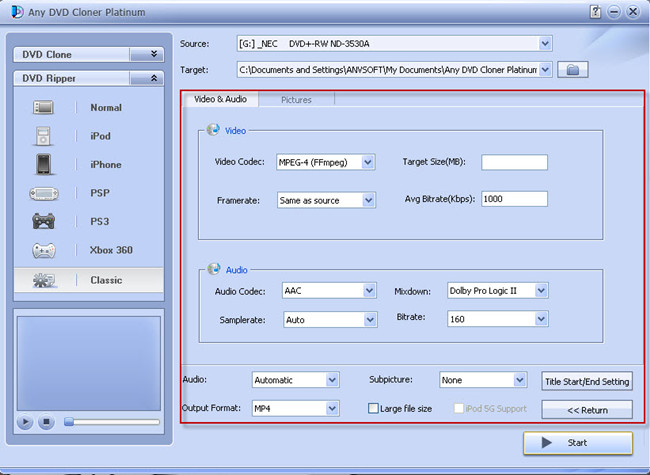
Step 4: Retun to DVD Ripper interface, and confirm MP4 is selected in "Output Format"
Note: MKV, MP4 and M4V also can be selected for playback on other portable players.
Step 5: Click "Start" to begin the ripping process.
Step 6: Transfer the file to your samsung galaxy note and enjoy the movie!
Popular topics you may be interested in ...
How to rip DVD to various video formats - Any DVD Converter
How to clone Super 8 to blank DVD disc - Any DVD Cloner
How to backup DVD movies on hard drive for free - DVDSmith Movie Backup Freeware
How to watch DVD movies on Samsung Galaxy S2 - Any DVD Cloner Platinum
Home | About | Legal Notices | Sitemap | Spotify Music Converter | Apple Music Converter | Amazon Music Converter | Tidal Music Converter | Streaming Audio Recorder | Video Enhancer AI | Face Blur AI | Photo Enhancer AI | AI Image Upscale | Streaming Video Downloader | Disney+ Video Downloader | HBOMax Video Downloader | Amazon Video Downloader | Netflix Video Downloader | YouTube Video Downloader | YouTube Music Converter
Copyright © 2005-2023 DVDSmith Inc., All Rights Reserved.