
Read the articles and guides to learn more about DVD copying and DVD ripping
    |

 Popular Topics
- DVD, Blu-ray VS. Streaming
- DVD Movie to Google Nexus 6P
- DVD to Samsung Galaxy S6/S6 Edge
- Rip DVD Movie for Roku 3
- Google Nexus 9 vs Nexus 7
- DVD to iPad Air 2
- DVD to iPhone 6/6 Plus
- Copy and Rip DVD on Yosemite
- DVD to iPhone 5
- DVD to Galaxy S3
- DVD to Galaxy note
- DVD to the new iPad
- DVD to HTC One X
- Burn Avengers DVD to blank disc
- DVD to Huawei Ascend D2/Mate
- DVD to BlackBerry Z10
- DVD to Huawei Windows Phone 8 - Ascend W1
- Copy Skyfall DVD on hard drive
- Convert The Hobbit: An Unexpected Journey to MP4
- DVD to LG Optimus G
- DVD to Phablet Converter
- Nexus 10 vs iPad 4 vs Kindle Fire HD 8.9 vs Samsung Note 10.1
- DVD to Nokia Lumia 920
- DVD to Sony Xperia S
- Backup Top 10 Horror Movies
Articles & Guides
How to player DVD folder with VLC Media Player ?
DVDSmith Movie Backup is DVD backup software for copying DVD to hard drive as DVD folder. You can use this software in conjunction with DVD burning software of your choice, to make a backup copy of any DVD video disc, or with Any DVD Converter Pro to convert your DVD folder to MP4, AVI, 3GP or other video formats for your iPod, PSP, mobile phones and many portable media players.
DVDSmith Movie Backup can make perfect-quality backup copies of all your DVD movies using your own computer hard disk. It can keep the same sound & video quality when you backup your DVD movies with all the special features, menus, subtitles, and languages included. Within a few clicks of your mouse, your favorite DVD has been cloned and will be playable on your computer with free media players like SMPlayer, The KMPlayer and VLC Media Player and Media Player Classic .
Newly released Movie DVDs like Wall-E, Sleeping Beauty, Iron Man, Disaster Movie, Bangkok Dangerous, can be easily copied to your hard drive with DVDSmith Movie Backup.
If you need to copy movie DVD to DVD disc, please use Any DVD Cloner Platinum. It's an easy-to-use and powerful DVD copying tool!
How to play DVD folder on hard drive with VLC Media Player?
VLC media player is an open source, free software media player written by the VideoLAN project. VLC is a portable multimedia player, encoder, and streamer supporting many audio and video codecs and file formats as well as DVDs, VCDs, and various streaming protocols. It is able to stream over networks and to transcode multimedia files and save them into various formats. VLC used to stand for VideoLAN Client, but that meaning is now deprecated. It is licensed under the GNU General Public License. It is one of the most platform-independent players available, with versions for Microsoft Windows, Mac OS X, Linux, BeOS, Syllable, BSD, MorphOS, Solaris and Sharp Zaurus. VLC media player can be downloaded from Videolan.org.
VLC Media Player supports many audio and video codecs and file formats, but M4V Videos is not included. To play iTunes M4V videos on VLC media player, you need convert iTunes M4V videos to DRM-free video formats. Noteburner M4V Converter Plus comes to help. Noteburner M4V Converter Plus (For Winodws / For Mac), a professional iTunes M4V to VLC video converter which can help you remove DRM protection and convert iTunes movies and TV shows losslessly to various video formats for playing on VLC Media Player. To learn more, you can visit: How to Convert iTunes M4V Video for Playing in VLC Media Player.
After copying DVD to hard drive as DVD folder with DVDSmith Movie Backup, you can use VLC Media Player to play the DVD folder without any DVD player. The video quality is just as the same as playing on DVD Player. Follow the steps below and you can enjoy DVD folder on hard drive.
1. Open VLC Media Player.
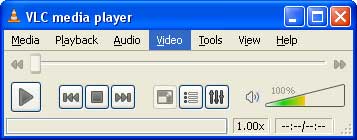
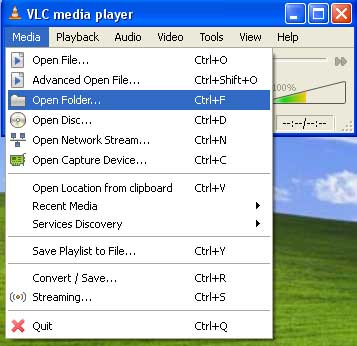
2. Click Menu "Media --> Open Folder".
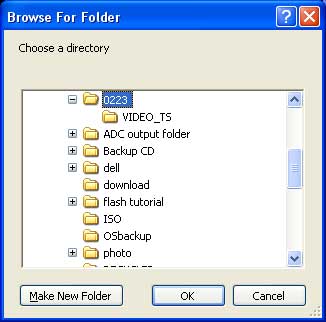
3. Browse the DVD folder copied by DVDSmith on your hard drive and click OK.
4. VLC Media Player will start to play the DVD folder on hard drive. Enjoy the DVD movie now!
Home | About | Legal Notices | Sitemap | Spotify Music Converter | Apple Music Converter | Amazon Music Converter | Tidal Music Converter | Streaming Audio Recorder | Video Enhancer AI | Face Blur AI | Photo Enhancer AI | AI Image Upscale | Streaming Video Downloader | Disney+ Video Downloader | HBOMax Video Downloader | Amazon Video Downloader | Netflix Video Downloader | YouTube Video Downloader | YouTube Music Converter
Copyright © 2005-2023 DVDSmith Inc., All Rights Reserved.