
Read the articles and guides to learn more about DVD copying and DVD ripping
    |

 Hot Devices
- DVD Movie to Google Nexus 6P
- DVD to Samsung Galaxy S6
- DVD Movie for Roku 3
- Google Nexus 9 vs Nexus 7
- DVD to iPad Air 2
- DVD to iPhone 6/6 Plus
- DVD to iPhone 5
- DVD to Samsung Galaxy S5
- DVD to Sony Xperia Z2
- DVD to Microsoft Xbox One
- DVD to Samsung Galaxy Tab S
- DVD to Apple iPad Air
- DVD to Lenovo IdeaPad Yoga 2
iPad 3 comes! DVD to iPad 3 Ripper is here for you!
"something you really have to see. And touch" - iPad 3
How to rip DVD movies to iPad 3 - DVD to iPad 3 Ripper
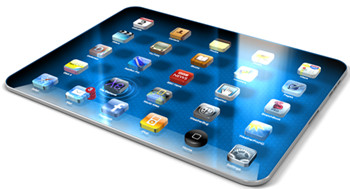 iPad 3 will have a brand spanking new processor, Apple's A6 - which will surely be a quad-core ARM-based processor. Quad-core designs are coming from various ARM partners and the Tegra 3 has already been launched by Nvidia, as well as the Snapdragon S4 from Qualcomm.
A retina display was widely predicted for the iPad 2, but of course the current iPad doesn't have a double-resolution display: for now, that's something you'll only get in the iPhone 4 and iPhone 4S. Could an iPad 3 Retina Display be on the way? It's the very first thing on our iPad 3 wish list.
The exciting news is that it looks as though it is happening, with Apple reportedly testing suppliers' current shipments of 2048 x 1536 resolution 9.7-inch displays. Now that iBooks 2 has been launched (as of 19 January 2012), we've also seen further references to 2x iPad screen images - these will, most likely, be for iPad 3. With such a large and high-resolution screen, it would be a great enjoyment to watch movies with the newest iPad 3.
DVD to iPad 3 Ripper key features
* Rip DVD to MP4, MKV, M4V
* Burn DVD to DVD, copy DVD to DVD folder or ISO Image File
* Customize DVD Structure to copy or shrink
* Shrink DVD-9 to DVD-5
* Remove all DVD copy protections
Download the best DVD to iPad 3 Ripping software to convert your favorite DVD movies to ipad 3 easily!


Click here for Any DVD Cloner Platinum Mac - Easy to copy / burn / rip DVD movies on Mac
How to Rip DVD Movies to iPad 3 with The Best DVD to iPad 3 Ripper
Step 1: Choose Open Method

Step 2: Open Source DVD
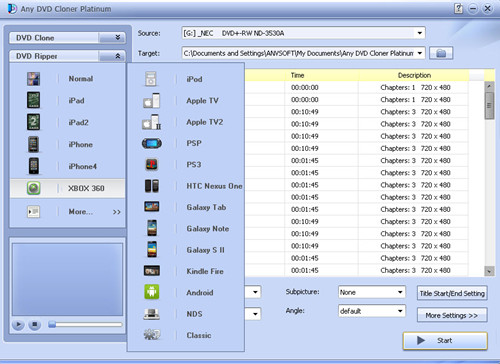
Step 3: Choose DVD Ripping mode
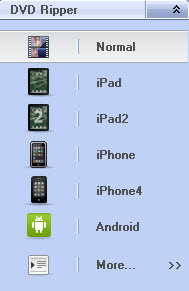
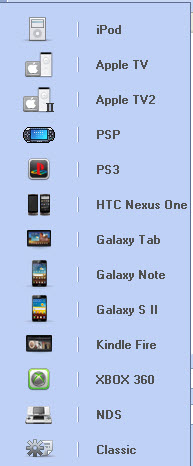
More than 10 popular portable devices such as Samsung Galaxy Note, Samsung Galaxy S2, ipad, Apple TV, etc are listed for users to select. Default setting with those options are more convenient for users to rip DVD movies to ipad 3, time can be saved.
Step 4: Choose Output Folder
Choose output folder in "Target" , which is used to save the output video file for playback on iPad 3. You can use windows default document folder. Or, select DVD Folder from the drop-down list of the Target option, and browse a folder to save the converted movie.
Step 5: Select Output Options

Audio: Here you can choose audio language for output video. The available options depend on original DVD.
Subpicture: Here you can choose subpicture for output video. The available options depend on original DVD.
Output Format: M4V, MP4 and MKV output formats are available. Please note you need to select right output format for your device.
Click Title Start/End Setting button, you can set chapters you want to convert for a certain title. For example, for title 2, chapters from 3 to 9 will be converted while other chapters won't.
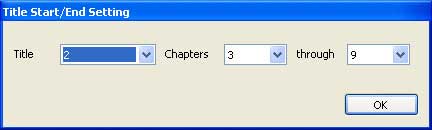
Step 6: Change More Settings
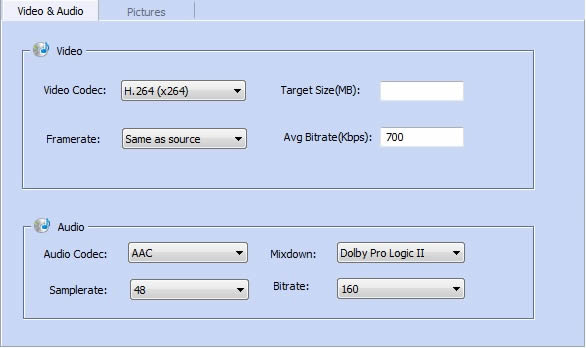
Click More Settings and two tabs will appear. They are Video, Audio and Pictures.
Under the Video & Audio tab, you can set the video and audio parameters.
Under the Pictures tab, you can crop the image:
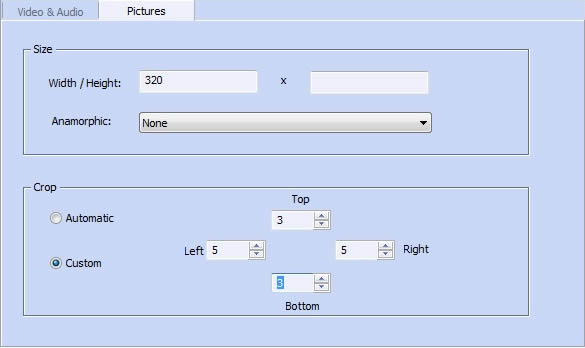
Step 7: Click " Start " button to begin the copying process
Note: The program will automatically replace the previous ripped movie with the newly ripped movie in the output folder. Thus, you need to manually transfer your converted movie to another folder once the program finishes ripping a DVD movie.
Extra Tips:

You might wonder how to transfer DVD movies to your iPhone/ipad/ipod, don't worry, Syncios Free manager has your back. Syncios Free Manager is a powerful iTunes alternative and iOS manager, trusted by millions Apple users. It can help you transfer, backup and restore data between your PC and iPad/iPhone/iPod without using iTunes. Learn More>>
Try the free trial version of Syncios Manager Now!
Home | About | Legal Notices | Sitemap | Spotify Music Converter | Apple Music Converter | Amazon Music Converter | Tidal Music Converter | Streaming Audio Recorder | Video Enhancer AI | Face Blur AI | Photo Enhancer AI | AI Image Upscale | Streaming Video Downloader | Disney+ Video Downloader | HBOMax Video Downloader | Amazon Video Downloader | Netflix Video Downloader | YouTube Video Downloader | YouTube Music Converter
Copyright © 2005-2023 DVDSmith Inc., All Rights Reserved.
Home | About | Legal Notices | Sitemap | Spotify Music Converter | Amazon Music Converter | Streaming Audio Recorder | Video Enhancer AI | Face Blur AI | Photo Enhancer AI | AI Image Upscale | Streaming Video Downloader | Disney+ Video Downloader | HBOMax Video Downloader | Amazon Video Downloader | Netflix Video Downloader | YouTube Video Downloader
Copyright © 2005-2023 DVDSmith Inc., All Rights Reserved.